Soutron ILS: Integrated Library System

Build a library system around your collection

Give staff, partners or the public secure access to branded, customized search portals that surface trusted, actionable information.

✓ Modernized cataloging, circulation, acquisitions, and serials workflows

✓ Your team self-serves: search and locate fast, with no trip to the desk

✓ Links to internal systems like SharePoint and iManage from inside a record

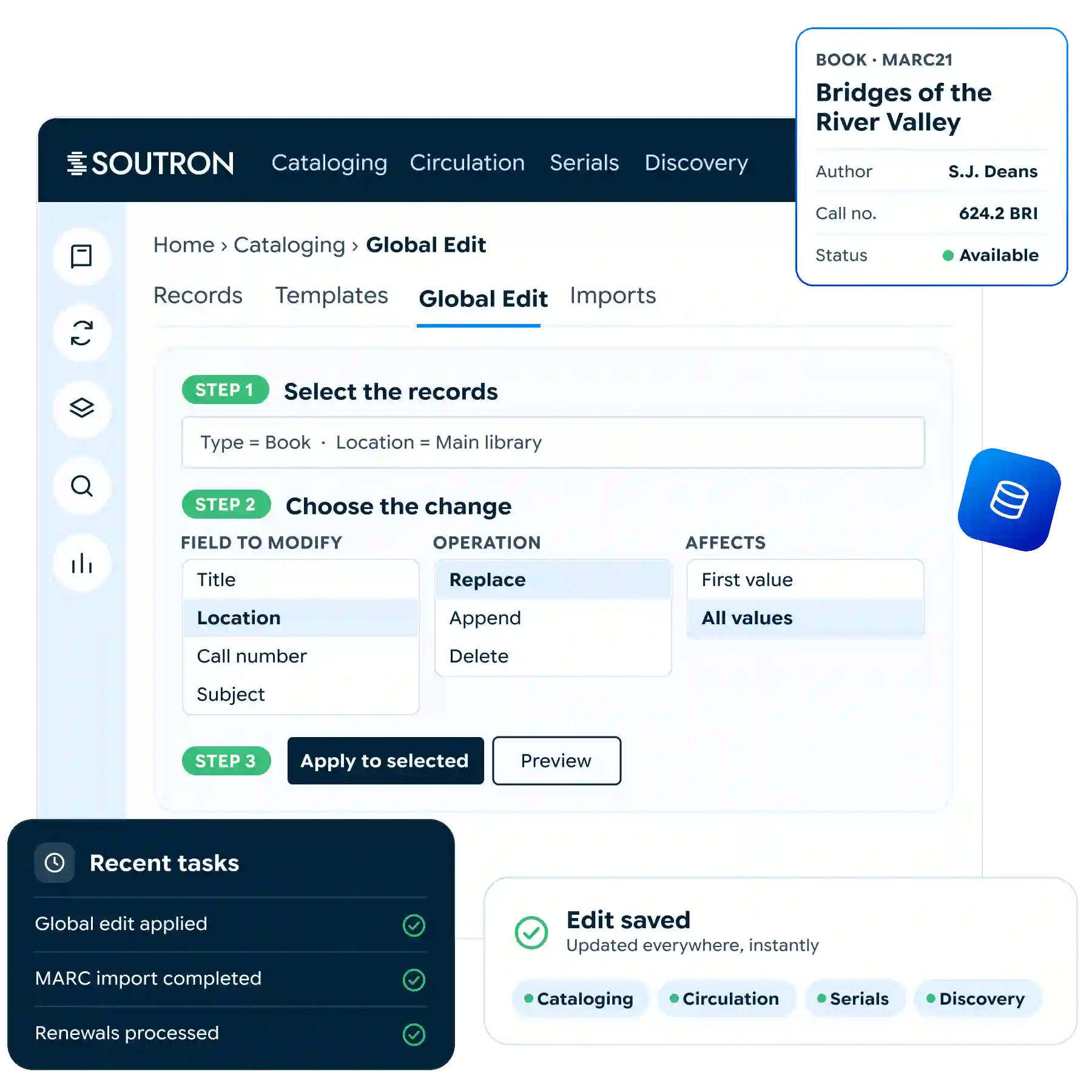
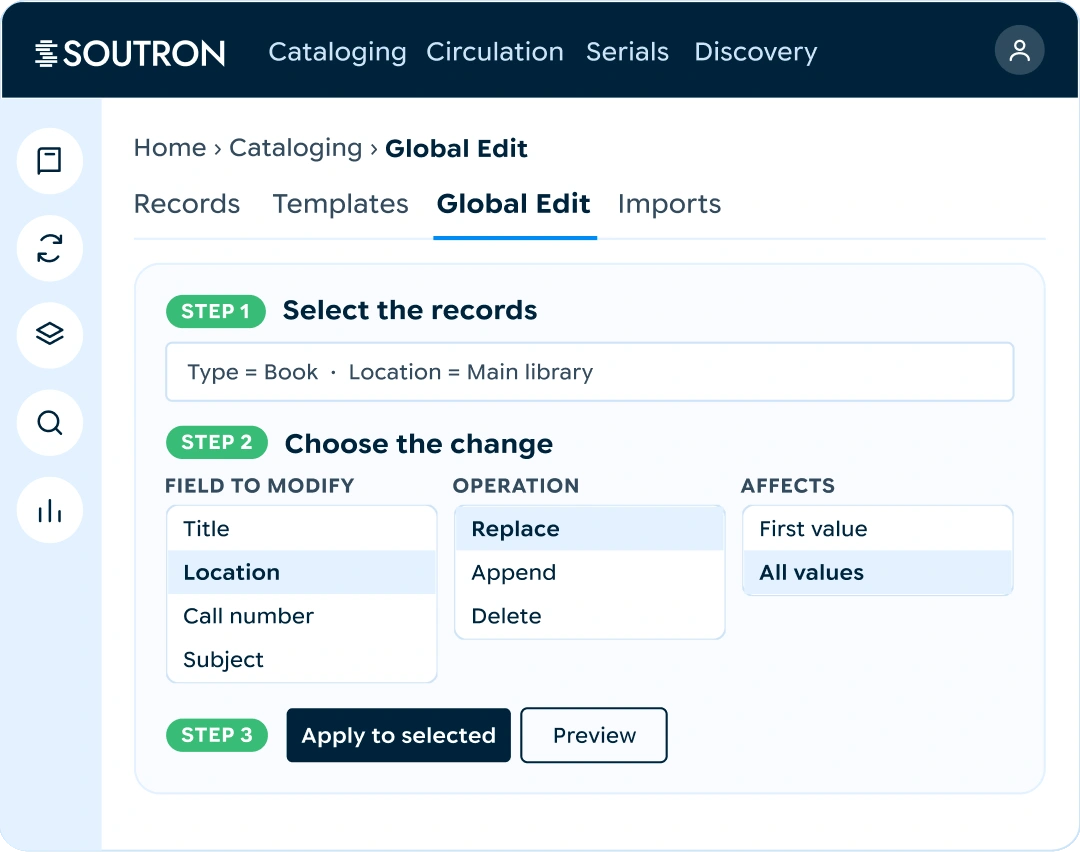
Soutron ILS global edit applying a location change across selected book records, with cataloging, circulation, serials and discovery updating together
30 years of experience icon
30+ yrs

of library & information management expertise behind the platform.

Hundreds of legacy migrations icon
100s

legacy system migrations completed.

24/7 help desk icon
24 / 7

help desk with a typical response in 20 to 30 minutes.

Data centres in four regions icon
4 regions

Data centers in the USA, Canada, UK, and EU.

Built to scale

The library system built for how you actually work

Law firms and legal teams icon

Law Firms & Legal Teams

One portal per practice group, so attorneys have self-service access to institutional knowledge assets the firm has in their law library.

Corporate and special libraries icon

Corporate & Special Libraries

Build custom information access search portals with enterprise-grade access control and usage data, built for your organization’s data.

Healthcare and public sector icon

Healthcare & Public Sector

Self-service access across every department (nurses, doctors, administration, janitorial), with the usage data to prove the library’s value at budget time.

Nonprofit institutions icon

Nonprofit Institutions

Showcase your collection and services with enterprise-grade reliability a lean team can run without IT techs on staff.

The Problem

Organizations need a custom, secure, integrated library system to surface information assets

Siloed data and file-sharing systems have created a sprawl of information where staff spend hours searching, coupled with security issues when shared file links never get updated.

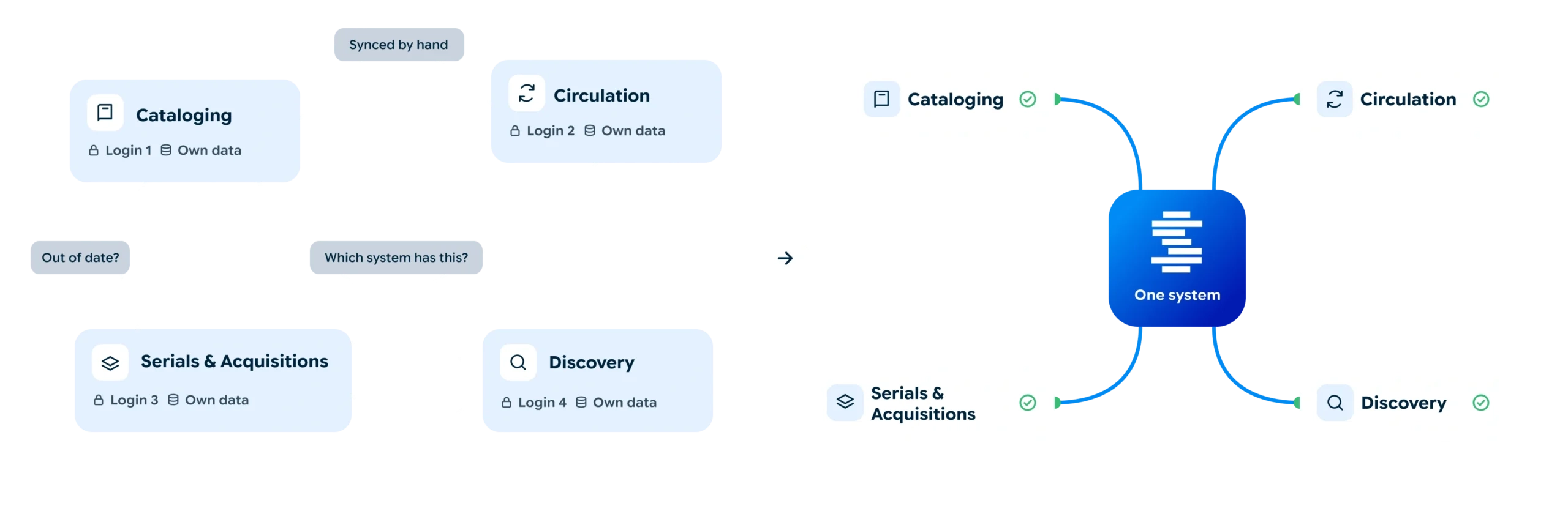
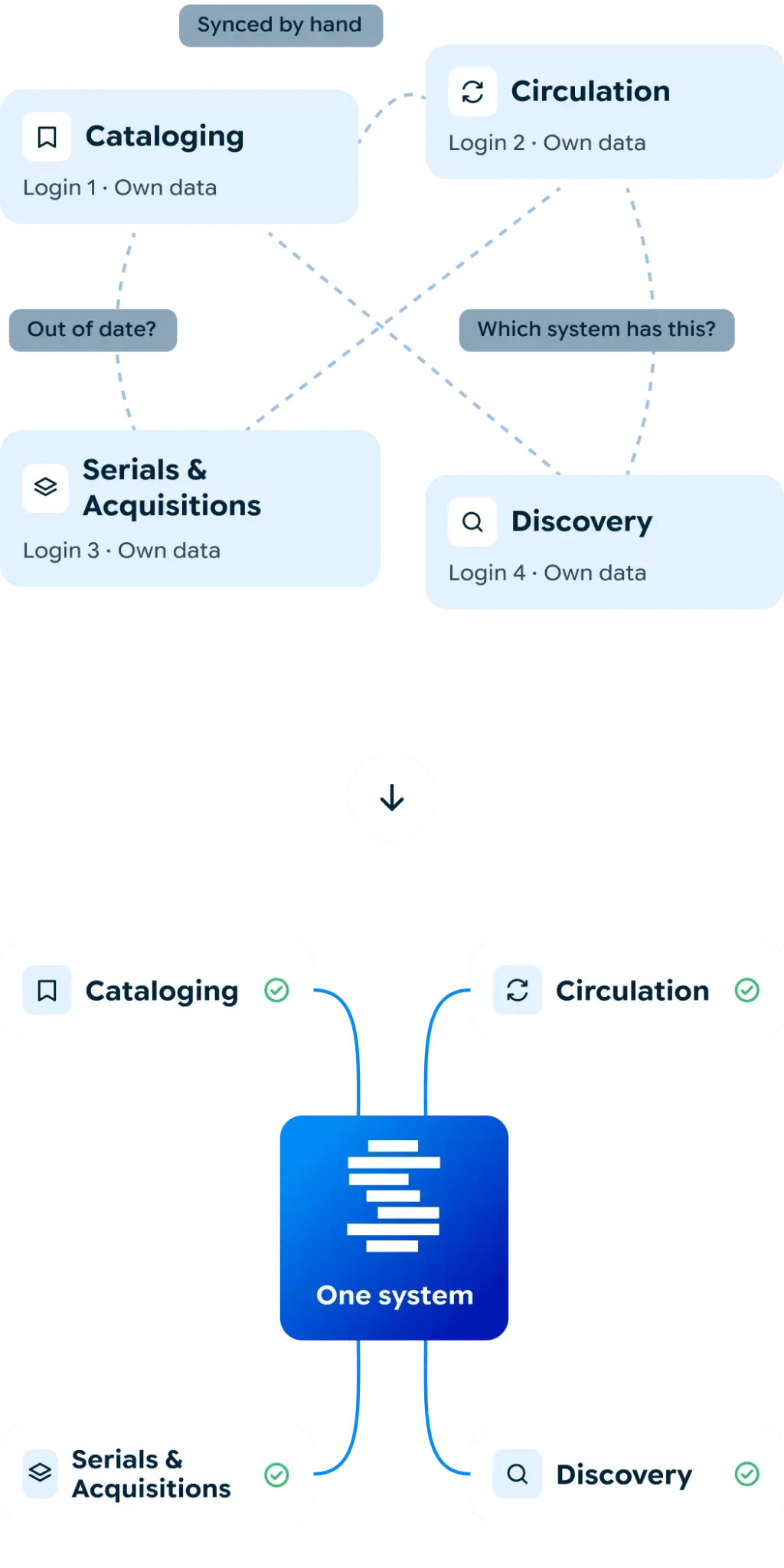
Cataloging, circulation, serials and discovery in four separate systems with four logins, replaced by one Soutron system holding all four
Now

Multiple data sets & file shares

Needed: One secure integrated library system database, holding all of your information assets.

With Soutron

One database, every job synced

Information access and asset security solved.

Our Core Solutions

Everything you expect from an integrated library system, and more

Cataloging

Fields that match your collection

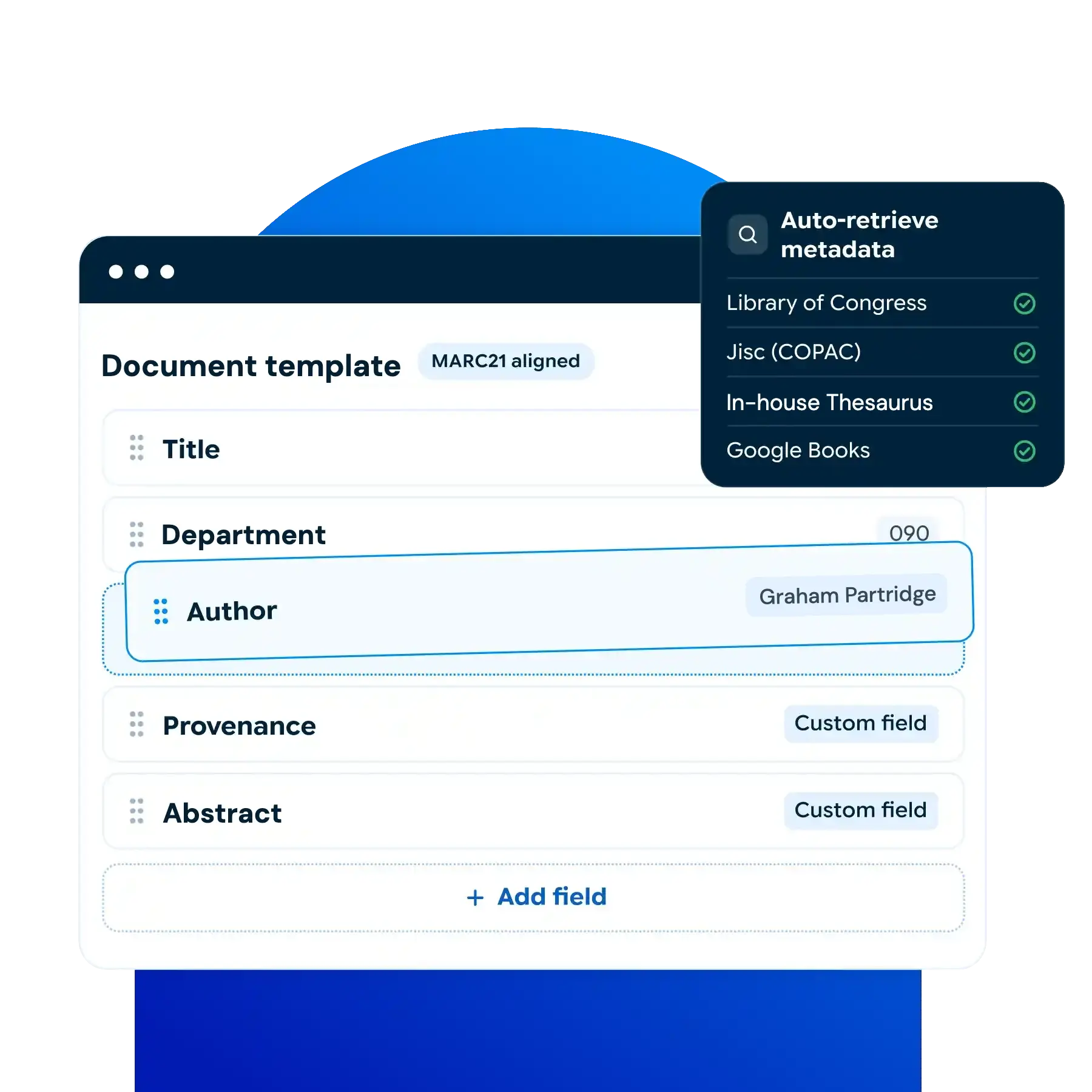
Build custom fields and record templates for any material type, with flexible alignment with industry and archival standards so you stay interoperable without being boxed in.

→ Auto-retrieve metadata from Library of Congress, Jisc (COPAC), Nielsen, and Google Books

→ Drag-and-drop field ordering per record type

→ Global Edit and Global Copy Edit for bulk changes across many records at once

MARC21-aligned book template with call number and author fields plus custom provenance and condition fields, and metadata auto-retrieved from Library of Congress, Jisc, Nielsen and Google Books
Custom Library Portal

Create customized windows to your information assets

A responsive, customized portal with faceted browsing and full record display. View video, audio, images, and documents from within the library portal. Edit it yourself with our template editor; no IT ticket required. 

→ Multiple portals: split by collection type or public vs. staff access

→ My Account: patrons self-manage loans, renewals, and saved searches

→ Build from a pre-built theme and extend with ideas from client examples

Branded public library portal with format filters returning video, audio and document records, edited in a template editor across public, staff and video archive portals
Access & Users

Confidentiality that scales with your org chart

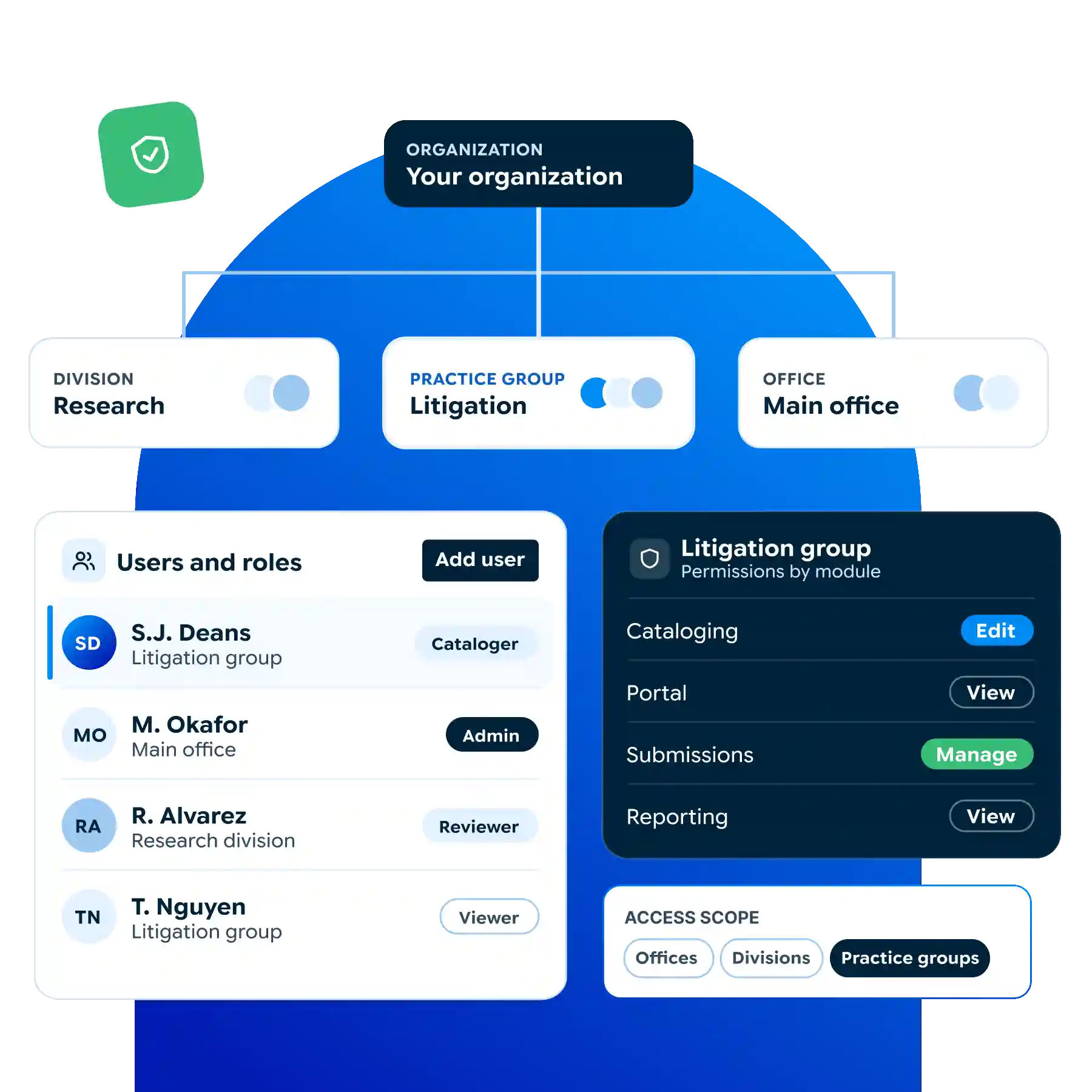
Role-based, granular group permissions control who sees what and how. Access matches your organization’s actual structure instead of a generic login for everyone.

→ User records, roles, and group-based permissions managed in one place

→ Access scoped to practice groups, divisions, or offices

→ The same control every module and portal draws from

Role-based access mapped to the org chart, with cataloger, admin, reviewer and viewer roles and permissions set per module by office, division or practice group
Submissions

Knowledge submission for people who aren't librarians

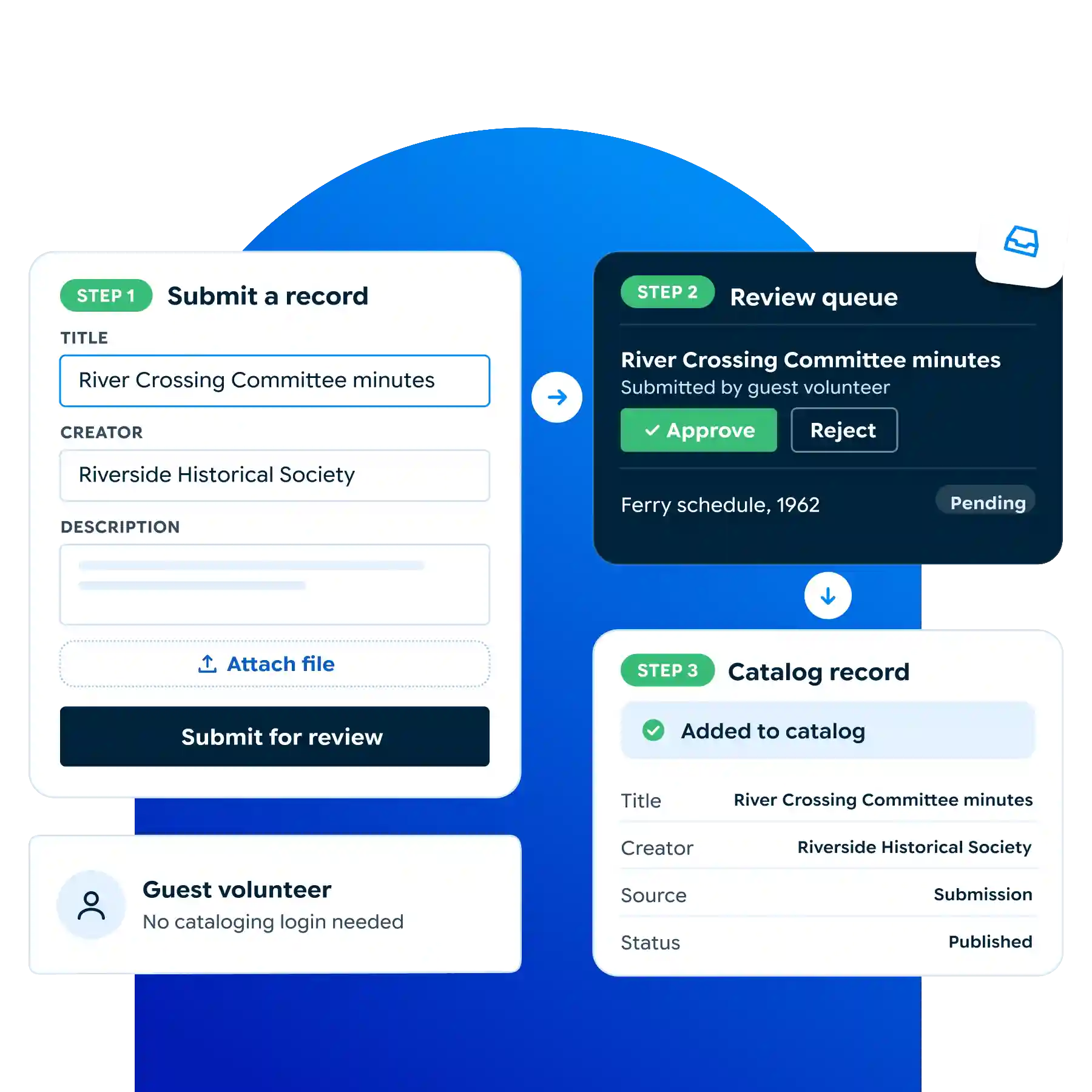
Configurable intake forms route through a review and approval workflow before anything reaches the catalog. A beloved way to get information assets cataloged quickly for knowledge sharing.

→ Intake forms from staff or the public, reviewed before publishing

→ An approved submission converts straight into a catalog record

→ Employees can submit documents and records without a full cataloging login

Guest volunteer submitting a record with no cataloging login, routed through a review queue for approval and published to the catalog
Reporting

The numbers for your next budget meeting.

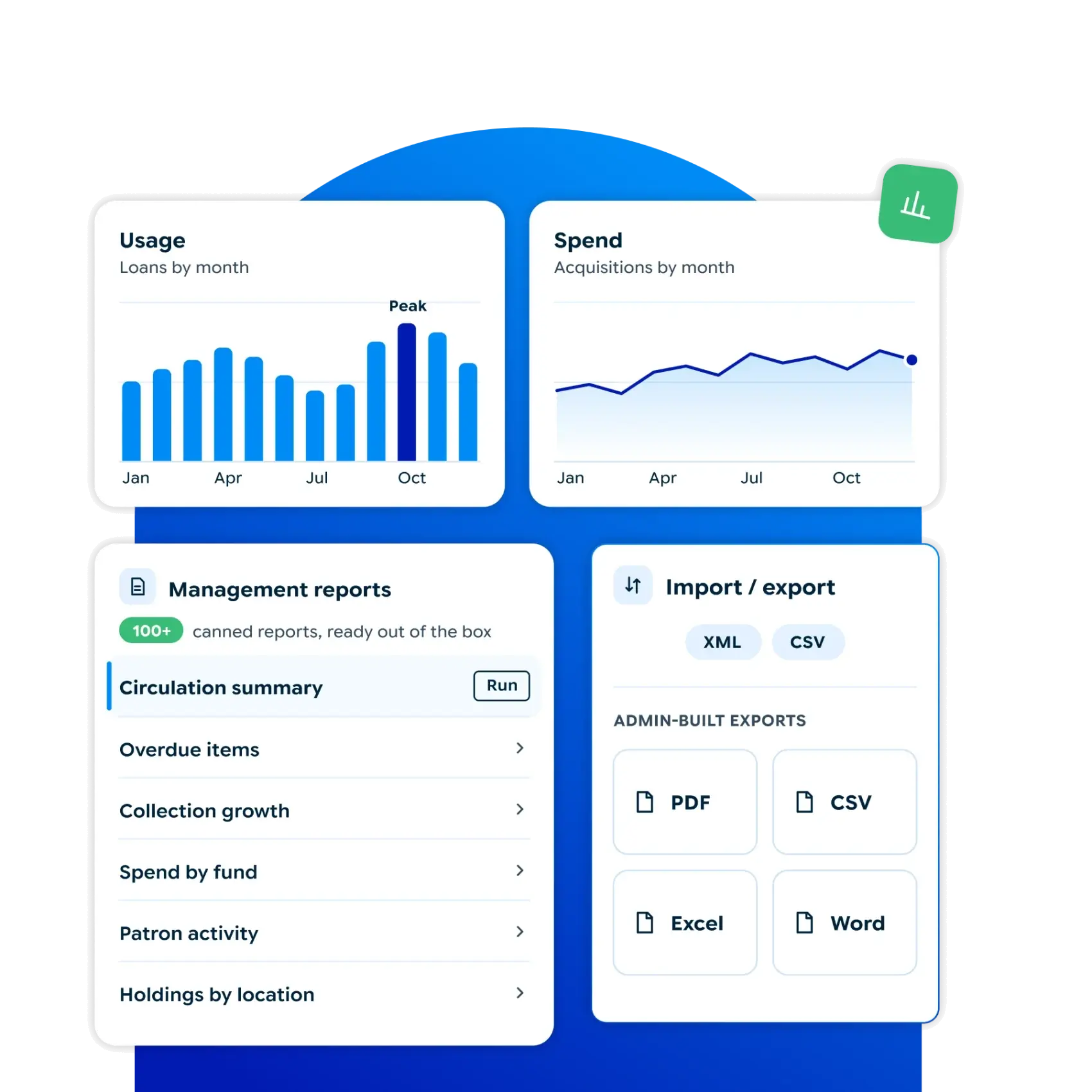
Built-in management dashboard reports plus import/export in XML, MARC21, and CSV, so usage and spend are visible without exporting to five spreadsheets first.

→ Import/export in XML, MARC21, and CSV

→ 100+ canned reports, ready to use

→ Visual dashboard reporting

Loans and acquisitions spend by month with over 100 canned management reports and exports to PDF, CSV, Excel and Word
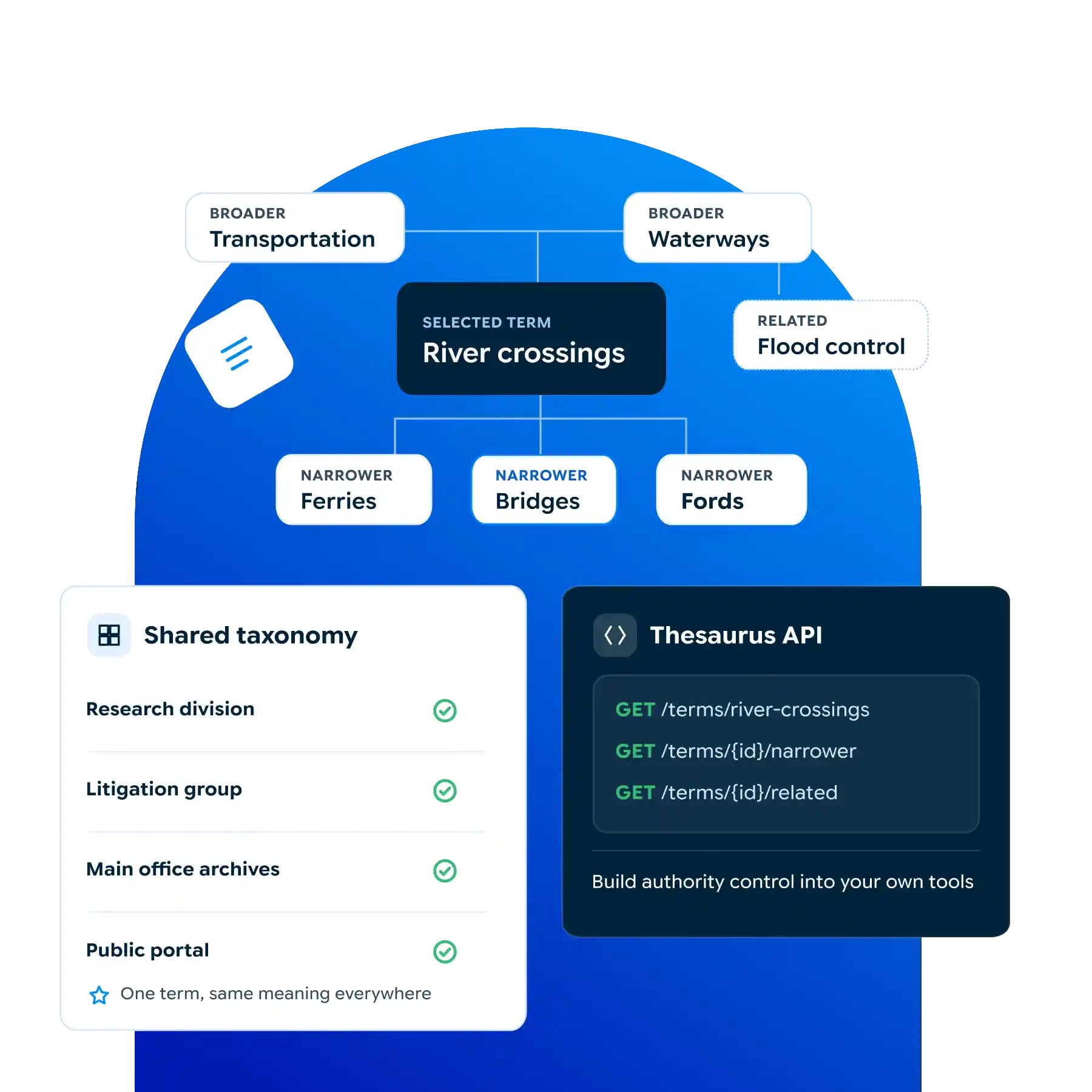
Thesaurus & Authority Control

One vocabulary for the whole organization

One controlled vocabulary improves communication across your organization, so a term means the same thing whether it’s used by one office or another.

→ Poly-hierarchical structure: broader, narrower, and related terms

→ Shared taxonomy across every office and department improves communication

→ Create any number of metadata thesauri, each with a full complement of term relationships

Thesaurus showing broader, narrower and related terms for one subject, shared across divisions and the public portal, with a thesaurus API
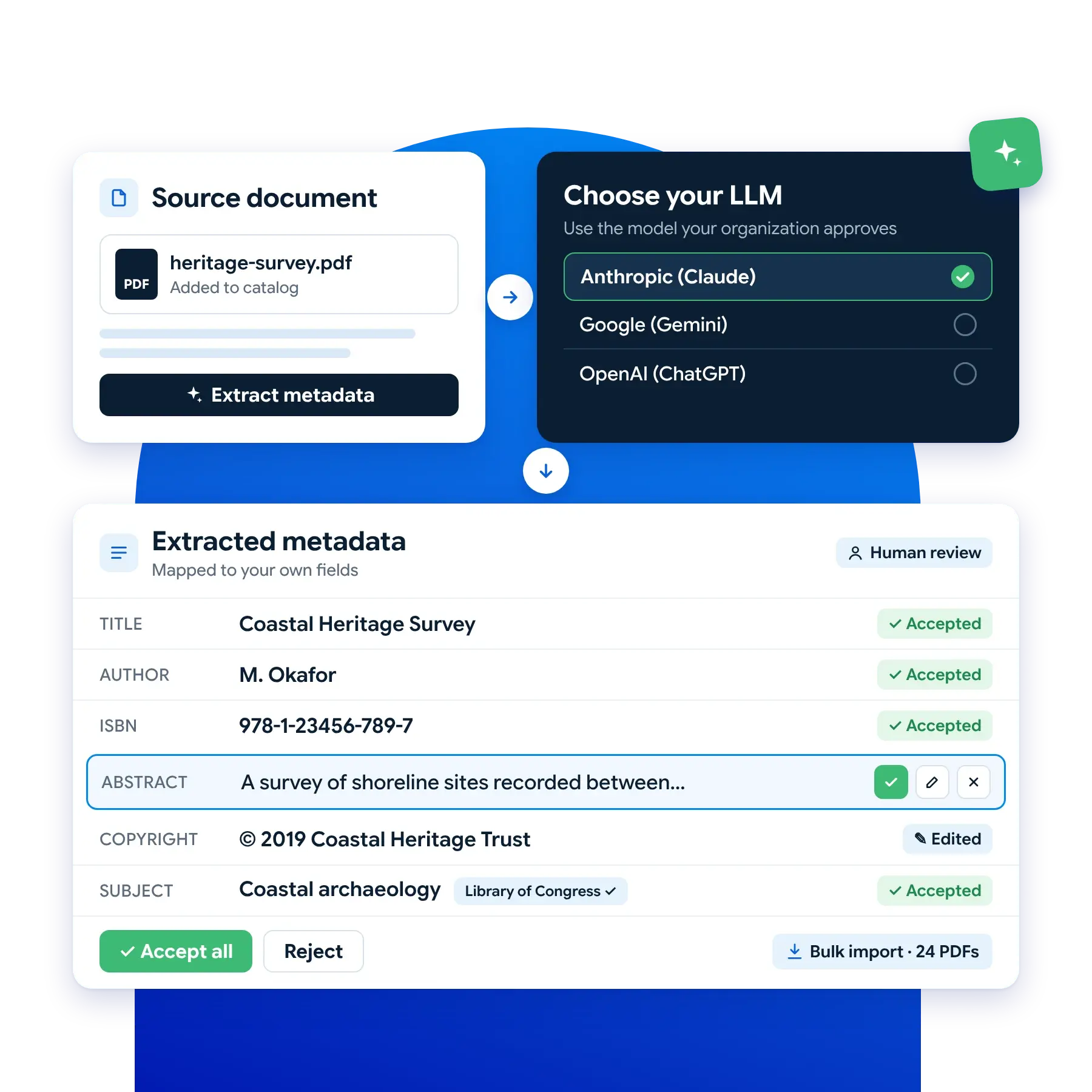
AI and Metadata

Faster cataloging, with a person still in charge

Add a PDF and the extractor pulls out metadata such as abstracts, ISBNs, authors, page counts, and copyright information. You choose the model: Anthropic (Claude), Google (Gemini), or OpenAI (ChatGPT), so you can use the one your organization has already approved. Staff check each suggestion and can accept, edit, or reject it before the record goes into your library or archive catalog.

→ Automatically map extracted metadata to your organization’s or department’s own fields

→ Check subjects against Library of Congress vocabularies where needed

→ Works for single records and for bulk PDF imports

AI and Metadata
Top features

Features included

Global edit icon

Global Edit

Update or copy-edit across large batches of records at once, instead of record by record.

Auto-cataloging and imports icon
Auto-Cataloging & Imports

Bring in records and bulk formats through configurable import maps.

Faceted filters icon
Faceted Filters

Narrow results by format, date, subject, or any field you’ve cataloged.

Direct linking to your toolkit icon

Direct Linking to your Toolkit

Direct links to Westlaw, LexisNexis, SharePoint, and iManage from inside a record.

My account dashboard icon

My Account

A personal dashboard within the Portal: self-manage loans, renewals, and requests; save searches; build personal collections; track history.

Custom pages icon

Custom Pages

Research guides, A-Z lists, and policy pages, published straight from the portal.

PDF and media player icon

PDF & Media Player

In-portal viewing for PDFs, images, audio, and video attached to any record.

Multiple portals icon

Multiple Portals

Split by collection type, or by public vs. staff access. One system, more than one front door.

Result and search templates icon

Result & Search Templates

Customize how results and records display, sort, and group. No two collections have to look alike.

AI summarizer icon

AI Summarizer

Optional, bring-your-own-key document summaries using your own Gemini, OpenAI, Copilot, or Anthropic account. Never trains on your data.

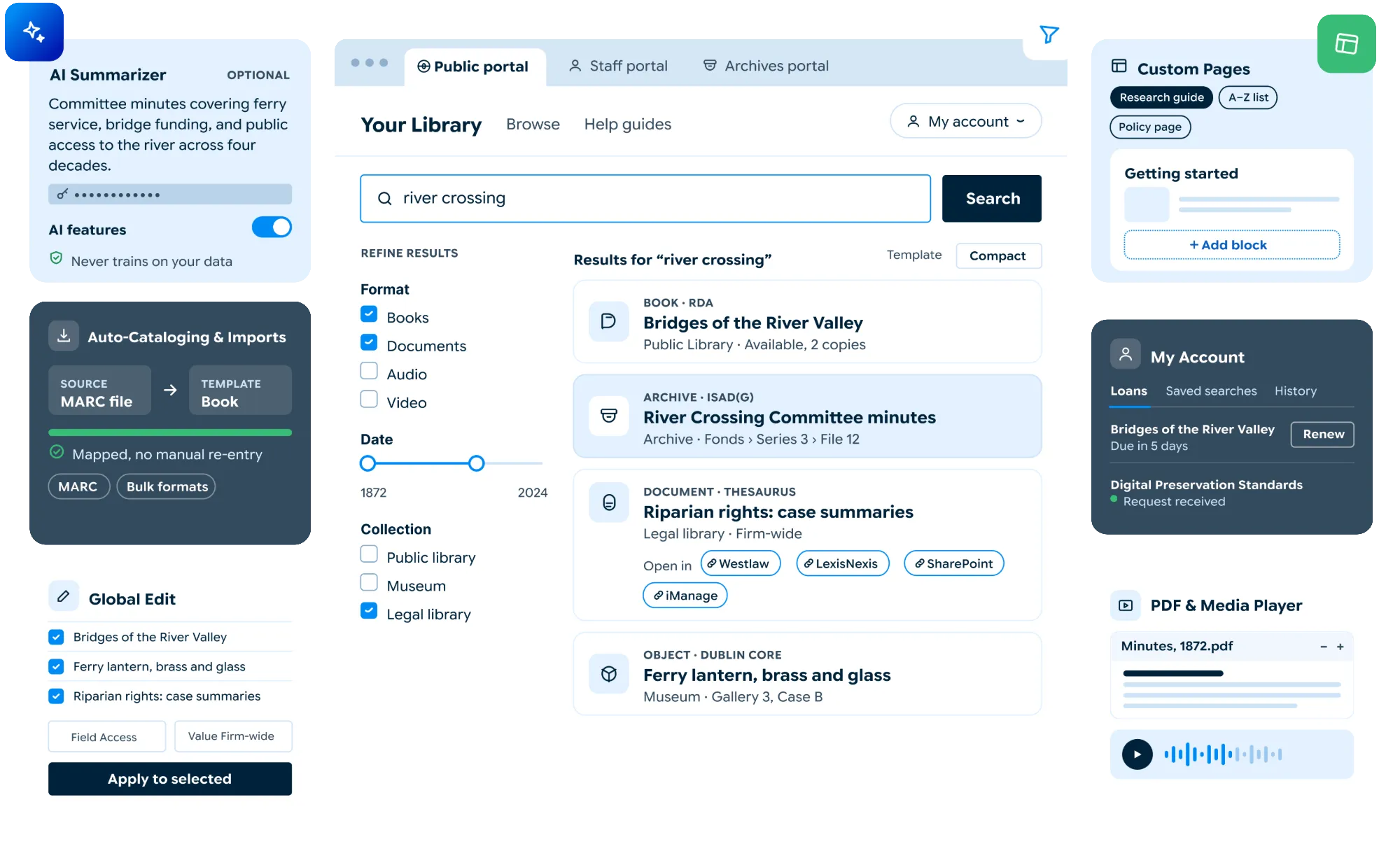
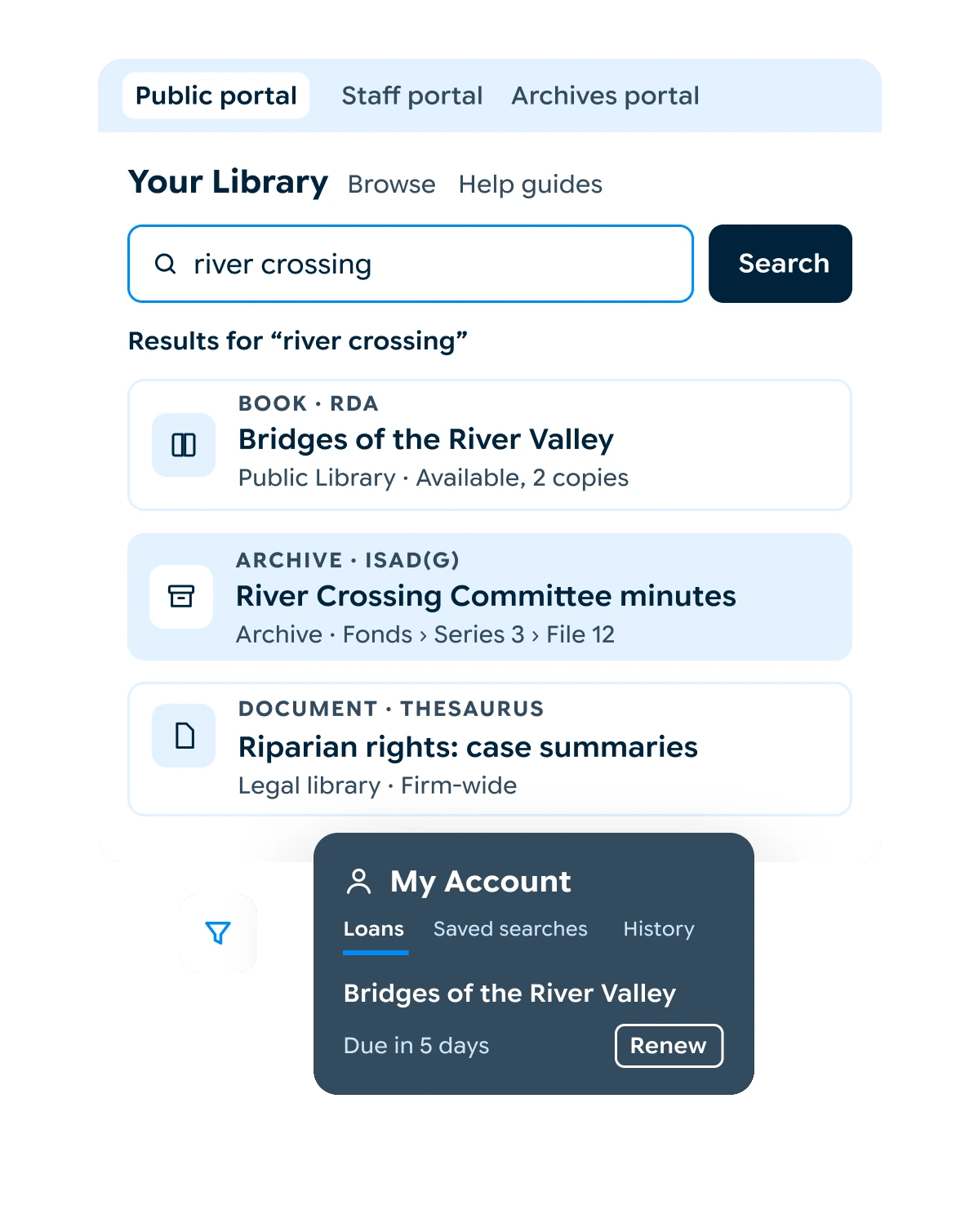
Soutron ILS portal showing search results across books, archives, documents and museum objects, with global edit, auto-cataloging, custom pages and an optional AI summarizer
Available add-ons

Add what the collection needs, when it needs it

Circulation

Loans, holds/renewals, and overdues, plus self-issue by barcode or RFID, on your own equipment, no manual processing.

Serials & Acquisitions

Journals, loose-leaf, and multi-volume sets, with fund accounting, budgets, and routing. Built for multi-office, multi-currency operations.

Archive

Collection → series → item structure, with flexible alignment to archive standards for archival material alongside your library holdings. Records can already exist in Soutron before you add this module.

API & Integrations

Use the embeddable search widget for surfacing the catalog on your own website or intranet. Plus SSO, connections to EBSCO, PubMed, SharePoint, and more.

Document Review

Reviewer-to-reviewer routing with version history, deadlines, and an audit trail, so know-how is checked before it reaches the collection.

Security

Security your IT team signs off on

Your IT team will thank you, and then give their approval.

Six-level, role-based security

File, field, record status, content, and record type, permissions, and roles.

Geo worldwide hosted

US, Canada, UK, and EU data centers. Residency follows your organization.

Audit logging

Retained 12+ months, so access is reviewable long after the fact.

Fully managed SaaS

No servers, patches, or upgrades for your IT team to own.

Public vs private views

Permissions by role, down to the field level. Public portal for open records, restricted access for the rest.

Support and onboarding

Get a partnership, not just a platform

Get implementation, training, and everyday support with every system, plus a world-class support team ready when you need help.

Clock icon

Global Help Desk

Get around-the-clock coverage Monday to Friday, with a four-hour response commitment and most tickets answered in 20 to 30 minutes.

Person icon

Support Group

Connect with the team and other customers using the same modules. Hear about updates first, share what works, and shape what’s next.

Hand holding a heart icon

Fully Managed

Hand implementation to a delivery team that runs it end to end, from data migration to portal design. We do the heavy lifting so you get up and running quickly. 

Support headset icon

Training Built In

Train hands-on with every implementation.

Get onboarded with confidence

1

Kick-Off

2

Portal Design

3

Data Mapping & Migration

4

Hands-On Training

5

Hypercare

6

Ongoing Support

FAQs

The questions we get the most, answered here first.

Does Soutron ILS require MARC or another cataloging standard?

No. Soutron accommodates standards such as MARC21 and Dublin Core. Your team defines its own fields and record templates instead of forcing your collection into rigid tags. For teams that prefer to stay MARC-based, the platform works with MARC, it just doesn’t require it.

Our SaaS solutions are hosted in data centers in the US, Canada, UK, and EU. Data residency follows your organization’s headquarters.

It links to them rather than fully integrating: direct links to Westlaw and LexisNexis from inside a record, plus linking and import with SharePoint and iManage (not two-way read/write access). Deeper SharePoint integration is on the roadmap.

Yes. My Account, a built-in Portal feature, lets your team search, request, renew, save searches, and review their own history without a trip to the desk.

Still have questions?

We’re here to help. Reach out to our team, and we’ll get back to you ASAP.

Customer testimonials

ipas-logo
★★★★★
“With the new automated Soutron capabilities, my output has more than doubled.”
Allison Campbell
lucideon-logo
★★★★★
“Soutron has been a brilliant, massive step forward for us and is now central to everything we do in the library.”
Caroline Mullington
national-association-of-realtors-logo
★★★★★
“The way that we were able to categorize everything from the archives in Soutron and display the search results was the major selling point.”
Abby Shaw
george-c-marshall-foundation-logo
★★★★★
“I wanted a simple search box, and am delighted that the result is clean, not complicated to use, and single search delivers results containing both library and archive materials.”
Melissa Davis
chatham-house-logo
★★★★★
“Since bringing Soutron onboard, the software has saved our library team huge amounts of time.”
David Bates

Customer testimonials

★★★★★

“With the new automated Soutron capabilities, my output has more than doubled.”

Ipas

★★★★★

“Soutron has been a brilliant massive step forward for us and is now central to everything we do in the library.”

Lucideon

★★★★★

“I find it so much easier to use than any other ILS that I’ve used. It makes sense, it’s more dynamic and its ease of use is great.”

National Association of REALTORS®

★★★★★

“I like how Soutron listens and services our small special library and archive.”

George C. Marshall Foundation

★★★★★

“Since bringing Soutron onboard, the software has saved our library team huge amounts of time.”

Chatham House